
Download CalZen – AI food tracker, calorie counter, macro tracker
Overview
CalZen is a free Android application designed to support users in managing their daily calorie intake and nutritional macros. The software serves as a comprehensive lifestyle tool that integrates food calorie tracking, weight loss monitoring, and overall health tracking into a single platform. It is particularly suited for individuals aiming to lose weight, maintain a balanced diet, or follow specific nutritional regimens such as keto or diabetes-friendly eating plans.
The app leverages artificial intelligence to provide personalized insights, including an AI-powered calorie deficit calculator and a nutrition scanner for real-time food analysis. Users can log meals, track daily nutrients, and monitor protein intake through a built-in counter. Additional functionalities include a food journal, meal planner, and an in-app food advisor to guide healthier food choices.
While the developer, CalZen Labs, has not provided detailed information on their background or company history, the app’s focus on health and nutrition suggests a targeted approach to digital wellness. Real-world usage scenarios include daily meal logging, macro tracking during fitness regimens, and managing dietary needs for chronic conditions such as diabetes. The app is intended for both casual users seeking better eating habits and those with structured health goals.
Key Features & Capabilities
- AI-Powered Calorie Deficit Calculator: Uses intelligent algorithms to estimate daily caloric needs and recommend a deficit for weight loss based on user input such as age, weight, and activity level.
- Macro Tracker: Enables users to monitor their intake of proteins, fats, and carbohydrates, supporting goals related to fitness, weight management, or dietary restrictions.
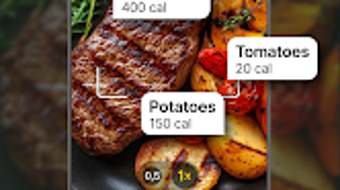
- Nutrition Scanner: Allows users to scan food items using their device’s camera to retrieve nutritional data and log meals quickly.
- Keto Diet Tracker: Offers specialized tools for users following a ketogenic diet, including tracking ketone levels and carb intake.
- Diabetes Management Features: Includes tools to help users monitor sugar intake and manage carbohydrate consumption in alignment with health recommendations.
- Food Journal & Meal Planner: Provides a structured way to record meals and plan future meals, promoting consistency in dietary habits.
- Protein Counter: Specifically tracks protein consumption, useful for fitness enthusiasts and individuals on high-protein diets.
- Food Advisor: Delivers real-time suggestions on healthier food alternatives based on logged meals and user goals.
These features are designed to streamline daily nutrition tracking and support long-term health improvements. For example, users can scan a packaged food item to instantly log its nutritional profile, reducing manual entry. The macro tracker helps individuals adjust their intake to meet fitness or dietary targets, while the food journal supports reflection and behavioral change over time.
The integration of AI ensures that recommendations adapt to user patterns, enhancing personalization. While the app does not specify exact data sources for its nutritional database, its functionality aligns with standard practices in health and fitness software. These tools collectively empower users to make informed decisions about their food choices and maintain accountability in their health journey.
User Interface, Workflow & Performance
CalZen features a clean, intuitive user interface designed for ease of navigation and efficient workflow. The layout prioritizes key functions such as meal logging, nutrient tracking, and goal monitoring, placing them within a few taps from the home screen. Users can access the food journal, macro tracker, and meal planner through a bottom navigation bar, ensuring consistent accessibility.
The app’s workflow is streamlined, allowing users to log meals either manually or via the nutrition scanner, with minimal steps required. The use of visual indicators, such as progress bars for daily goals and color-coded nutrient breakdowns, enhances readability and user engagement. While the developer did not specify resource usage details, the app’s size of 45.2 MB suggests a lightweight footprint, which may contribute to efficient performance on mid-range Android devices.
General performance observations are based on standard software behavior patterns, indicating smooth operation under normal conditions. Stability appears to be a priority, with no reported issues related to crashes or freezes in publicly available information. However, exact CPU and RAM behavior were not disclosed.
The app supports offline functionality for basic logging, though synchronization with cloud data may require internet access. Overall, the user experience is optimized for daily use, making it suitable for both new and experienced health trackers.
Compatibility & System Requirements
CalZen is designed exclusively for Android devices. The current version, 1.2.1, is compatible with Android operating systems, though specific version requirements were not provided. The installation size is 45.2 MB, which is relatively modest and suitable for devices with limited storage capacity.
The developer did not specify exact hardware requirements such as minimum RAM or processor speed. Compatibility information was partially provided, leaving details about device support and OS versions open to interpretation. Users should ensure their Android device meets general app installation standards to run CalZen without issues.
While the app is available on the Google Play Store, no official information was shared about tablet support or other platform availability. The lack of detailed system requirements means users may need to test the app directly on their device to confirm full functionality. For those seeking a lightweight, mobile-based nutrition tracker, CalZen presents a viable option, especially on Android smartphones with standard specifications.
Pros and Cons
Pros
- Free to download and use with no subscription required.
- AI-powered tools for personalized calorie and macro tracking.
- Integrated nutrition scanner for quick food logging.
- Supports multiple dietary goals, including keto and diabetes management.
- Compact file size (45.2 MB) suitable for devices with limited storage.
- Intuitive interface with easy navigation and visual progress tracking.
- Offline functionality for basic meal logging.
Cons
- Android-only platform; no support for iOS or desktop systems.
- Exact system requirements and OS version compatibility not specified.
- Performance under heavy usage or on low-end devices not documented.
- Limited information on data privacy and security practices.
- Reliance on third-party nutritional databases may affect accuracy.
FAQ Section
Is CalZen available for iOS devices?
Currently, CalZen is only available for Android devices. There is no official information about an iOS version or future platform expansion.
Is CalZen safe to use and secure?
The app is free to download and operates on Android. While no detailed security or privacy policies were provided, users should ensure they review the app’s permissions and data usage before installation.
How often are updates released?
The latest version is 1.2.1, released on May 10, 2024. The frequency of future updates has not been disclosed by the developer.
Does CalZen require an internet connection?
Basic functions such as logging meals and viewing the food journal can be used offline. However, features like the nutrition scanner and cloud sync require an active internet connection.
Can I use CalZen without a subscription?
Yes, CalZen is available as a free application with no mandatory subscription. All core features are accessible without additional fees.
Final Thoughts
CalZen stands out as a capable, AI-enhanced food and nutrition tracker tailored for Android users focused on health and wellness. Its integration of calorie tracking, macro monitoring, and specialized tools for keto and diabetes management makes it a versatile solution for diverse dietary needs. The app’s clean interface, compact size, and offline functionality enhance usability, particularly for users seeking a lightweight, no-cost tool.
While the lack of detailed system requirements and platform limitations restrict its accessibility, the app delivers strong value for its target audience. It is especially beneficial for individuals managing weight, following specific diets, or aiming to improve daily eating habits. With a free model and AI-driven insights, CalZen offers a practical and accessible way to stay on track with health goals.
For Android users looking for a reliable, all-in-one nutrition companion, CalZen provides a compelling option.
Download CalZen now






.png)
